Car Park Types & Tariff Management

Flexible configuration for any car park layout with sophisticated tariff structures

Complete Flexibility for Every Car Park Configuration

MyCarPass adapts to your unique car park layout and pricing strategy. Whether you operate a simple single-entry facility or a complex multi-level structure with multiple entry/exit points, our system handles it all with ease.

Configure single or multiple tariff structures, set time-based pricing like council car parks, manage EV charging bays with overstay enforcement, and create QR code access for partners and guests. Our flexible platform gives you complete control over how your car park operates and generates revenue.

Supported Car Park Configurations

We support all car park layouts and entry/exit configurations

Single Entry/Exit

One barrier controlling both entry and exit. Perfect for smaller car parks with simple traffic flow. ANPR captures vehicles in both directions.

Single Exit Only

Entry barrier with dedicated exit barrier. Most common configuration for controlled parking with payment on exit or pre-paid access.

Multiple Exits

Single or multiple entries with multiple exit points. Ideal for large facilities, shopping centers, or multi-level car parks with distributed exits.

How can Car Park Tariffs work for your business?

Why not get in touch to find out more information, or read our FAQ section.

Vehicle Whitelist Management

Authorise vehicles to park freely — no charges, no PCNs — with a flexible whitelist system built for both small teams and large fleets. Add individual vehicles instantly through the admin panel or upload hundreds of registrations in seconds via a bulk CSV import.

Individual Whitelist Entry

Add a single vehicle registration directly from the admin dashboard. Assign it to one or more car parks, set an optional expiry date, and the vehicle is immediately authorised. Perfect for adding a new employee, a VIP visitor, or a contractor on the fly.

Bulk CSV Upload

Got a large team or a fleet to manage? Upload a spreadsheet of vehicle registrations in one go. Our CSV import wizard maps your columns, validates every registration, and flags any errors before committing — so you never accidentally import bad data.

  • Instant Authorisation: Whitelisted vehicles are recognised by ANPR cameras as soon as the entry is saved — no delays, no manual restarts.
  • Date-Bound Permits: Set a start and end date on any whitelist entry. When the permit expires the vehicle is automatically removed — no manual clean-up needed.
  • Multi-Site Support: Assign a single vehicle to multiple car parks in one step, ideal for staff who move between sites during the day.
  • CSV Validation: Our importer highlights duplicate registrations, invalid plate formats, and missing mandatory fields before anything is saved.
  • Full Audit Trail: Every whitelist addition, edit, and removal is logged with the admin user's name and a timestamp — fully auditable at any time.
Individual Entry Bulk CSV Upload Auto-Expiry Multi-Site

Add Individual Vehicle

AB12 CDE
Main Site — Level 1
17/03/2026
31/03/2026
Add to Whitelist

Bulk CSV Upload

Drag & drop your CSV file here, or click to browse

Required columns: vrm, car_park  |  Optional: start_date, end_date, notes

Upload & Import

Vehicle Blacklist & Security Alerts

Protect your sites instantly. Flag any vehicle, add your security contacts, and receive real-time alerts the moment a blacklisted vehicle is detected by any ANPR camera across your estate.

1. Add Vehicle to Blacklist

Enter the vehicle registration (VRM), make, model, colour, and a reason for blacklisting — such as outstanding debt, a security incident, or previous property damage. The reason is included in every alert sent to your security contacts.

2. ANPR Automatic Detection

Every ANPR read across all of your car parks is automatically cross-referenced against the blacklist in real time. The moment a match is found — day or night — the system triggers instantly.

3. Instant Security Alerts

All enabled security contacts are notified immediately via their preferred channel — email, SMS, or both. Alerts include the vehicle details, reason for blacklisting, the car park name, and the ANPR image captured at the camera.

What You Can Manage in the Admin

Blacklist Management
  • Vehicle Details: Capture VRM, make, model, and colour so your security team can visually identify the vehicle on arrival.
  • Reason for Blacklisting: Record a clear reason (e.g. "Outstanding debt – £2,400" or "Security incident 14/02/2026"). This reason is embedded in every alert sent to contacts.
  • Immediate Effect: As soon as a vehicle is added to the blacklist it is active across all sites — no need to configure each car park separately.
  • Remove or Review: Remove a vehicle from the blacklist at any time. A full history of blacklist activity is retained for audit purposes.
Security Contact Management
  • Add Contacts: Register security personnel by name, email address, and/or mobile number.
  • Notification Preference: Choose how each contact is alerted — Email, SMS, or both. Different contacts can have different preferences.
  • Enable / Disable Contacts: Temporarily disable a contact (e.g. during leave) without deleting them. Re-enable at any time with a single toggle — their details and preferences are preserved.
  • Broadcast to All Active Contacts: When a blacklisted vehicle is detected, every enabled contact is notified simultaneously — there is no risk of a single point of failure if one contact misses an alert.
Add Vehicle to Blacklist
Security Alert: Blacklisted vehicles trigger immediate alerts to all security contacts when entering any car park.
E.G. AB12 CDE
e.g. Ford
e.g. Transit
e.g. White
e.g. Outstanding debt – £2,400, Security incident, Previous damage to property…
This reason will be included in all security alerts for this vehicle
Cancel Add to Blacklist
Security Contacts
Name Notify via Status
J. Smith
j.smith@example.com · 07700 900000
Email SMS Enabled
R. Patel
r.patel@example.com · 07700 900111
Email Disabled
T. Evans
t.evans@example.com · 07700 900222
SMS Enabled

Flexible Tariff Structures

Create simple or complex pricing models to match your business strategy. From flat rates to sophisticated time-based charging, MyCarPass handles it all.

Single Tariff Car Parks

Apply one uniform pricing structure across your entire facility. Perfect for straightforward operations where all customers pay the same rate.

Example: £2.00 per hour, maximum £8.00 per day
Multiple Tariff Car Parks

Define different tariffs for various zones, time periods, or customer types. Ideal for maximizing revenue through dynamic pricing.

Zone A (Premium): £3.50 per hour
Zone B (Standard): £2.00 per hour
Zone C (Economy): £1.50 per hour

Tariff Configurations

24/7

Time-Based Pricing

Multi

Zone Support

Auto

Calculation

Council-Style Time-Based Tariffs

Implement sophisticated time-based pricing structures similar to council-operated car parks. Charge different rates based on duration, time of day, or day of week.

  • Hourly Increments: £1.50 for first hour, £2.00 for second hour, £1.00 per additional hour
  • Time of Day Pricing: Peak rates 8am-6pm, reduced rates evenings and weekends
  • Maximum Daily Caps: Set maximum charges to prevent excessive fees for long stays
  • Grace Periods: Free parking for first 15/30 minutes to encourage quick drop-offs
  • Seasonal Pricing: Adjust rates for peak tourist seasons or special events
  • Free Periods: Free parking on Sundays, bank holidays, or after 6pm

Tariff Schedule

EV Charging Bay Management

Coming soon: Intelligent enforcement for electric vehicle charging spaces

Restricted Access Control

Limit EV charging bays exclusively to electric vehicles. ANPR system cross-references vehicle registrations against DVLA database to verify EV status and prevent unauthorized parking.

Overstay Monitoring

Track how long vehicles occupy EV charging bays. Set maximum stay limits (e.g., 2 hours) and automatically issue PCNs to vehicles exceeding the permitted duration.

Charge Status Detection

Integration with charging station APIs to detect if vehicle is actively charging. Issue PCNs to EVs connected to charger but not actively drawing power.

Automated EV Enforcement

Automatically generate PCNs for non-EV vehicles in charging bays, EVs exceeding time limits, or vehicles not charging. Complete audit trail with photographic evidence.

QR Code Guest & Partner Access

Generate QR codes for seamless guest registration and partner management. Perfect for hotels, offices, events, and businesses with frequent visitors.

How QR Code Access Works
  • Generate QR Codes: Create unique QR codes linked to specific car parks with customizable validity periods
  • Guest Registration: Visitors scan QR code and enter their vehicle registration number
  • Automatic Authorization: Vehicle registration added to whitelist for ANPR system recognition
  • Barrier-Free Entry: ANPR recognizes authorized vehicle and grants automatic access
  • Email confirmation: Send an email confirming the allocated car park, dates and times
  • Fixed End Date (NEW): Settings an end date will ensure the whitelist ends on a date.
QR Code Duration Options
Hourly (1-24 hours) Daily (up to 7 days) Weekly Monthly Yearly End of Day (expires midnight) Custom (user-selected up to 7 days)
QR Code Access

Partner QR Code Management

Delegate QR code management to trusted partners, allowing them to manage guest access independently while maintaining centralized oversight.

Partner Accounts

Create partner accounts for hotels, offices, or businesses. Each partner gets their own login to manage QR codes for their guests without admin intervention.

Dedicated QR Codes

Assign specific QR codes to partners. Each code linked to partner's organization with custom branding and validity rules.

Self-Service Management

Partners can generate, distribute, and revoke QR codes for their guests. View usage analytics and active registrations in real-time.

Usage Reporting

Track partner QR code usage with detailed reports. Monitor number of scans, vehicles registered, and parking duration for billing or analytics.

Car Park Barrier

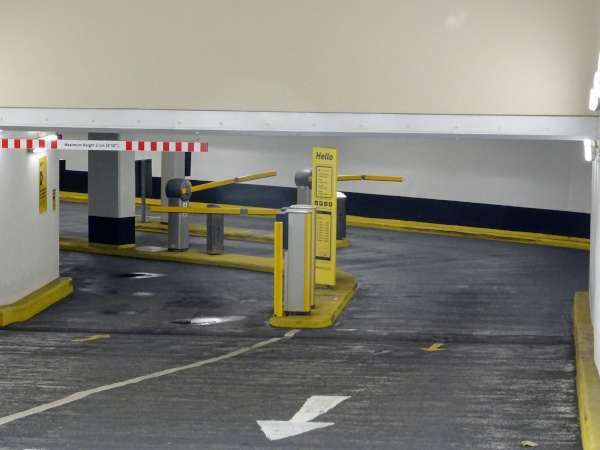
You can restrict access to a car park using barriers. Upon a vehicle entering the car park, if a barrier exists and the vehicle is approved to enter the car park, then the barrier will open. A number of other features include:

  • Restrict Entry: A barrier can prevent unauthorised vehicles from entering the car park
  • Prevent Maximum Capacity: Prevent the barrier from opening if the car park spaces limit has been reached
  • Restrict Exit: To prevent vehicles entering the car park from the exit, but allow all or vehicles to exit.
  • Override Barrier: Manually open the barrier, for example if the delivery driver needs to enter/exit the car park
Car Park Barrier

Barrier Activity Logging & Analytics

Track every barrier movement with comprehensive activity logs. Monitor entry and exit patterns, identify usage trends, and maintain complete audit trails for security and compliance purposes.

Automatic Activity Recording

Every time a barrier opens or denies access, the system automatically logs the event with complete details — vehicle registration, timestamp, direction (entry/exit), and access status (granted/denied).

What Gets Logged
  • Vehicle Registration: VRM of every vehicle that triggers the barrier, whether access is granted or denied
  • Precise Timestamps: Exact date and time of each barrier activation down to the second
  • Direction Tracking: Entry or exit movement logged separately for accurate flow analysis
  • Access Status: Whether the barrier opened (access granted) or remained closed (access denied)
  • Denial Reasons: Why access was denied — expired permit, blacklisted vehicle, carpark full, or unauthorised
  • Real-Time Car Park Occupancy: Live tracking of vehicles in/out to calculate current occupancy at any moment
Reporting & Analytics
Peak Time Analysis Custom Date Ranges CSV Export Occupancy Reports Denial Analytics
Barrier Activity Log
VRM Direction Status Time
AB12 CDE
Entry Opened 26/03/2026
09:15:42
XY98 ZPQ
Entry Denied 26/03/2026
09:14:18
LM34 NPR
Exit Opened 26/03/2026
09:12:05
RS67 TUV
Entry Opened 26/03/2026
09:08:33
KL90 MNO
Exit Opened 26/03/2026
09:05:17
847

Entries Today

823

Exits Today

34

Access Denied

96%

Success Rate

Real-World Use Cases

See how different businesses leverage our car park management features

Hotel Guest Parking

Hotel reception generates QR code upon check-in. Guests scan code, enter registration, and enjoy barrier-free access for duration of stay. Automatic expiry at checkout.

Office Visitor Parking

Corporate partners receive dedicated QR codes. Visitors scan before meetings, register vehicle, and park without reception involvement. End-of-day expiry ensures no overnight parking.

Event VIP Access

Generate time-limited QR codes for event attendees. VIP guests receive QR code with ticket purchase, scan on arrival, and access premium parking zones automatically.

Frequently Asked Questions

Common questions about Car Parks and Tariffs

Yes, car parks have operational times which are setup against days of the week. If the vehicle has overstayed in the car park longer than the payed duration, then they will receive a parking fine.

Our Custom built algorithm will first determine which day, and then determine which set of times the user is in between, then charge accordingly.

Yes, if the user attends the car park before opening times then they will receive a PCN

Yes you can. The parking charge notice we send to the users address will include details on how to dispute it.

Our ANPR cameras can detect any unauthorised vehicles in the staff car park. To ensure that staff to not receive a PCN make sure staff vehicles have been entered into the whitelist either via the QR Code, Hanger Card or manually adding the vehicle to the whitelist. It may be a better option of having a barrier at the entrance of the car park.

Not a problem, just simply add the staff vehicle registration to the whitelist manually against the public car park.

As soon as you have confirmation from us that your car park is ready to be enforced, then that would be the time to start adding all staff vehicles either by QR Code, Hanger Card or manually adding to the whitelist.

Yes, we can restrict car park spaces to your company, for example, if you have been assigned 5 spaces and an unauthorised vehicles parks, then we can issue a PCN.

We can design and manufacture the car park signs on your behalf. We would prefer this option because we have a legislation that we need to follow, which the signs need to show at the entrance of a car park in order for a car park to be enforced.

Please let us know and we will book one of our engineers to fix the issue. In the mean time you can manually open the car barrier to the up right position using the emergency unlock tool provided.

Yes, we can enforce car parking spaces specifically for a zone for a specific duration and issue PCN if the vehicle was to stay longer than expected.

Yes, You can choose the permit to be cross site, so when the user exists car park 1, a whitelist will be generated in both car park 1 and car park 2

No, Our system is designed to determine if the user has already paid for parking the same day, therefor will not charge the user multiple times during the same day, assuming that the user has entered/exit multiple times within the same time period.

Yes, absolutely! MyCarPass supports multiple tariff zones within a single car park. You can designate premium zones near entrances or elevators with higher rates, standard zones with mid-tier pricing, and economy zones further away with lower rates. The ANPR system tracks which zone each vehicle parks in and calculates the appropriate charge automatically.

Our ANPR cameras at each exit point are linked to the central system, so it doesn't matter which exit a vehicle uses. The system tracks entry time and calculates the correct charge regardless of exit point used. Payment can be made at any kiosk before leaving, or automatically charged to account balance or pre-paid permit.

When this feature launches, ANPR cameras will monitor EV charging bays specifically. The system will check if the vehicle is an EV (via DVLA database), track occupancy duration, and integrate with charging station APIs to verify active charging status. If a non-EV parks in the bay, a vehicle overstays the maximum time, or an EV is plugged in but not charging, the system automatically generates a PCN with photographic evidence.

Yes, you have complete flexibility to set time-based pricing. For example, you could charge £3/hour on weekday mornings (peak commuter time), £2/hour in the afternoon, and £1/hour after 6pm and on weekends. You can also set free parking periods (e.g., Sundays or after 8pm) or seasonal variations. The system automatically applies the correct rate based on when the vehicle entered and exited.

QR codes can be shared (that's the point!), but they're secure through time-based expiry and one-time registration limits. Once a guest scans the QR code and registers their vehicle, that specific registration is valid for the QR code's duration. You can configure QR codes to allow single-use (one vehicle only) or multi-use (multiple vehicles for businesses with many visitors). All QR code usage is logged with timestamps and IP addresses for audit purposes.

No, partner accounts are completely isolated. Each partner can only see and manage their own QR codes and registered vehicles. They cannot view other partners' data or access administrative functions. Only administrators have full visibility across all partners and can manage partner permissions, view consolidated reports, or revoke partner access if needed.

When the QR code validity expires, the vehicle registration is automatically removed from the whitelist. If the vehicle is still in the car park, it will be flagged as unauthorized and treated like any other violation. You can configure the system to send courtesy notifications before expiry, issue PCNs immediately upon expiry, or allow a grace period. The ANPR system will capture exit photos and can either block exit or issue a PCN depending on your enforcement policy.

Yes, you can set daily maximum charges to cap fees for long-stay parkers. For example, you might charge £2/hour but set a daily maximum of £10, so even if someone parks for 8 hours (normally £16), they only pay £10. You can set different daily maxes for weekdays vs weekends, or have no cap at all. The system automatically calculates whichever is lower - the hourly total or the daily maximum - and charges accordingly.

Get In Touch

Fields marked as * are mandatory.

Related Features

Cloud-Based Platform

Access your system anywhere, anytime with automatic updates, enterprise-grade security, and 99.9% uptime SLA guarantee.

Event Module

Purpose-built for event companies to manage parking operations, attendee lists, VIP access, and real-time capacity tracking for concerts, festivals, and sporting events.

ANPR Camera Management

Cloud-connected cameras with real-time monitoring and updates.